Formatting Dates in a Data Grid
I am attempting to add a Data Grid to a form. The Data Grid will only be used to display data to the users. They will not be able to add, edit, or delete records. The Data Grid is configured with a Lookup to get the data that needs to be displayed.
Two of the fields that are being returned by the query are datetime fields in the database. However, I only want to display the Date portion of the field in the Data Grid formatted as MM/dd/yyyy. I am using a FORMAT function in my lookup query to reformat the dates like this:
SELECT
FORMAT(th.PREndDate,'MM/dd/yyyy') as PREndDate
,FORMAT(th.PostDate,'MM/dd/yyyy') as PostDate
FROM ....
When I validate the query and view the Raw Data, the date fields are formatted as I expected them to be:
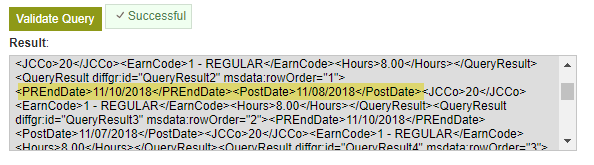
But if I validate and view the Formatted Data, the dates are showing in a long ISO format:
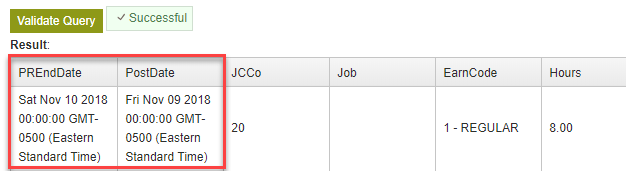
And thus when I test my form and view the Data Grid, the dates are in this same ugly format:
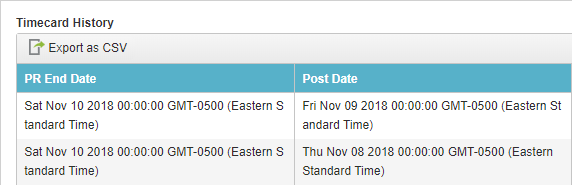
How can I get these dates to display the way I want them to (MM/dd/yyyy) in the data grid?
-

I will pass this to dev team, because the resulting column is returning the result in datetime datatype, while the result should be of string format. In the meantime, try using CONVERT instead of FORMAT function which ensures the result will be string instead of a datetime datatype.
Since the result is in datetime data type, we render in the ISO format, it is the standard that we follow in eForm, any value of datetime datatype will be displayed in ISO format.
Syntax:
CONVERT(VARCHAR(10), ‘Datetime value’, 110)
Example:
SELECT
CONVERT(VARCHAR(10), th.PREndDate, 110)
, CONVERT(VARCHAR(10), th.PostDate, 110)
FROM .... -

Lucas - Thanks for the tip. Using a SQL CONVERT function does work. Interesting thing to note here:
I wanted my dates to be in MM/dd/yyyy format (with slashes). You would normally do that in a CONVERT function with date type 101 like this:
CONVERT(varchar(10),th.PREndDate,101)
However, when I tried that, I still got the ISO format in the output. I had to use the date type 110 (as you showed in your example) which returns the date with dashes: MM-dd-yyyy.
Not a big deal. We can live with the dashes but it does make me wonder how AgilePoint is deciding when to convert the output to ISO format.
One other quick questions about the Data Grid:
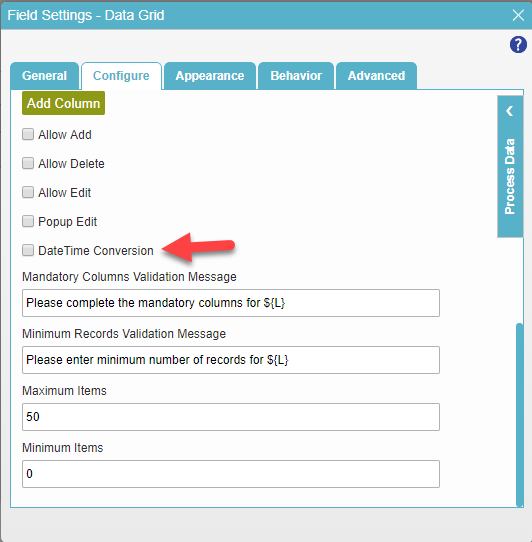
I noticed that there is an option in the Configure tab named "DateTime Conversion". Do you know what this does? It is not shown in the documentation for the Data Grid control. I tried checking it but it did not seem to make any difference in how things behaved.
請登入寫評論。
評論
2 條評論