Setting up Email Service Event

I'm having trouble setting up an event to fire when a new email is received. I don't understand what values I need to fill in for the "Office 365 Service URL" or the "Name":
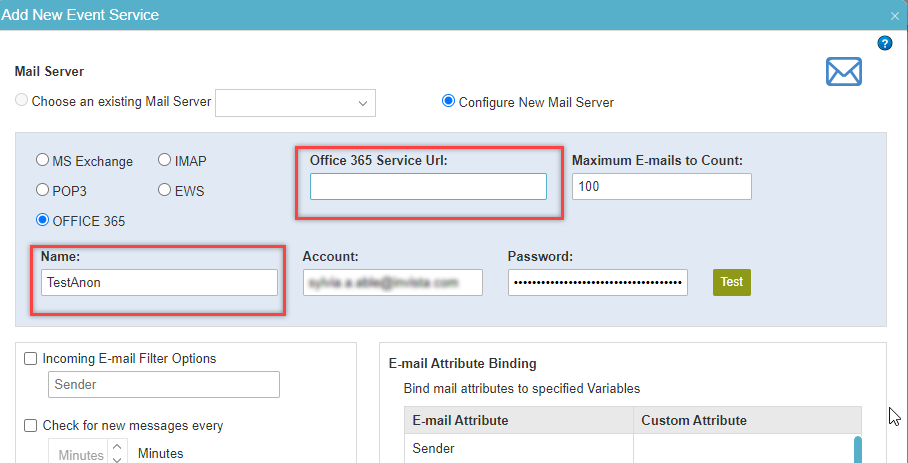
Also, are there any security changes that need to be made in Office 365 to make this work?
-
正式评论

Hi Sylvia,
To locate the EWS for Microsoft Exchange Online / Office 365- Access your journaling mailbox account using Outlook Web App (OWA)
- Click Setting icon on the top right (Gear icon) > View All Outlook Settings > Settings > Mail > Sync Mail

- In the list of entries, locate the server name. The URL of exchange web service for the mailbox is the URL: https://<ONLINE_URL>/EWS/Exchange.asmx, i.e https://outlook.office365.com/EWS/Exchange.asmx
BTW - I think that by now, https://outlook.office365.com/EWS/Exchange.asmx, is a fixed endpoint for all tenants...
For your second question: "Any security changes that need to be made in Office 365 to make this work?"
Answer: if you have 2FA enabled on your tenant, than you need to create an App password for the account being used to authenticate, and use it as the password for the AgilePoint Event Service Mail Server configuration.
Hope this helps.
Thanks,
Yaniv.
评论操作
请先登录再写评论。
评论
2 条评论