Button Rules running in subform on button creation (without an actual button click)

Hi, I have NX 6.0. I have a subform that gets populated by a query. The rows of the subform have a button that I've called Submit, but the action is set to Click. There are 4 rules on the buttons - populate an ID field on the screen and run 3 autolookups.
The issue is when the query populates the subform, all the row button rules run (they flash on the screen for each row loaded into the subform) and the last data row is what "remains" on the screen... so you see that in the ID field, and the autolookup results.
Why would the button rules run when the buttons are "created" and not when there is a physical click, since I have the action set to click? Or is there no correlation?
I'm assuming that it's because I don't have a "when" for my button rules, only have the "then" set (see screenshot below). All the other times I have this for button rules, the rules don't fire until the button is clicked. So, it's something about when the button is created is firing the rules.
Any clue what I would put for the button rule "when"? I see that I can put the button field there, but the options are: is present, is blank, is equal to, etc. Nothing about when clicked.
Thoughts or other ideas?

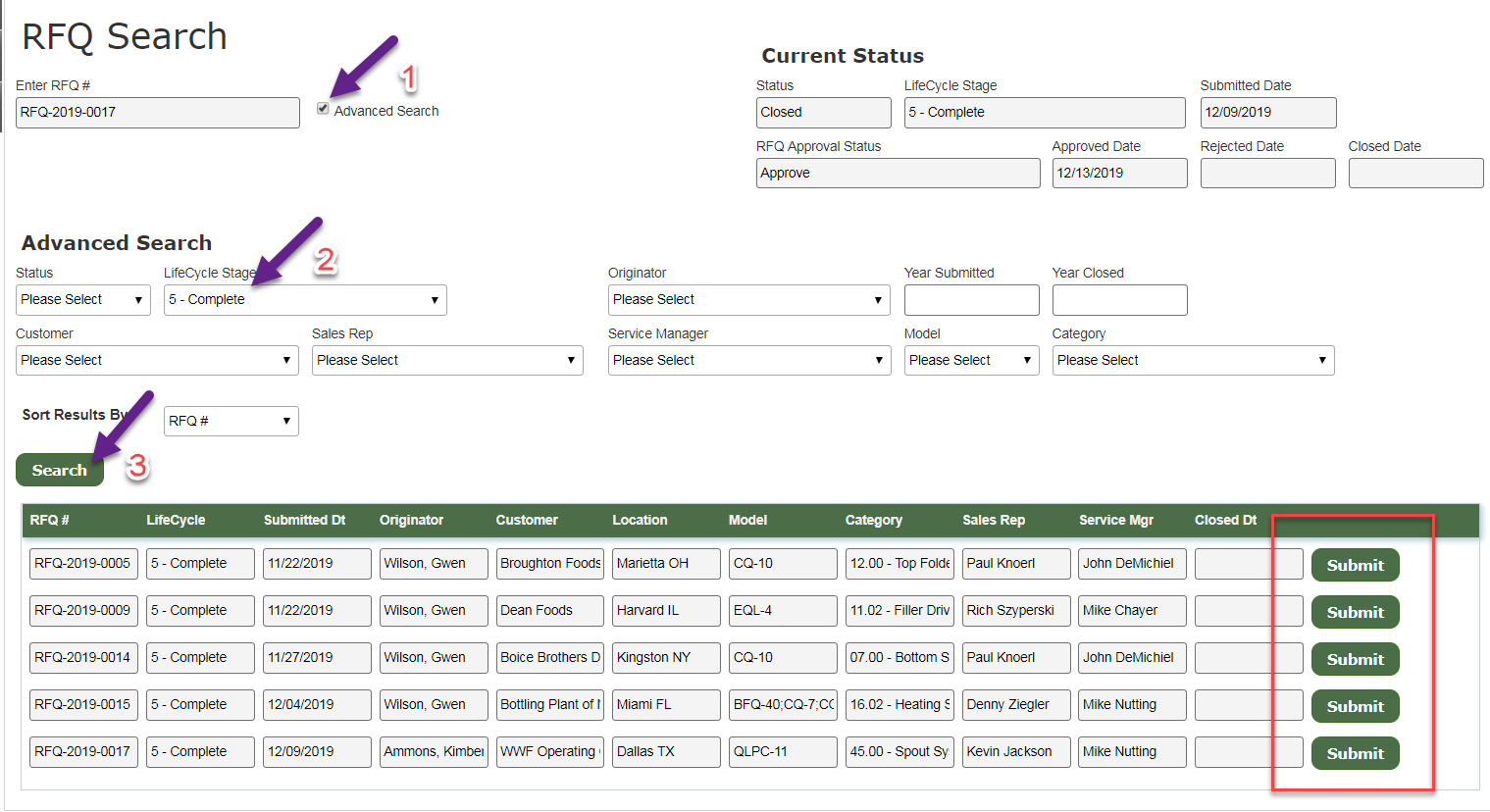
For reference, here's my screen with the steps taken:
1) click Advanced Search (this is as opposed to the user entering the ID manually)
2) pick a search field to filter the results (optional, but I did here to limit the results returned)
3) click Search which runs the query to populate the subform. This is when I can see all the RFQ ID's flash in the top text box and "land" on the last row's ID. The autolookups have run (results are the disabled fields on the upper right and other tab screens not shown in the screenshot).
The subform works fine after this part. I can click on random Submit buttons in the subform and the applicable rules run as expected.
-

Hi Gwen,
indeed there is a problem, that buttons in the subform raise change event on creation (after autolookup fills the data to the subform). We did a workaround for that: we created a variable "isLoaded" and set it to false. After autolookup completion we set it to true and in the button rules in "then" you can define a condition, that isLoaded=true.
Regards,
Alexey
请先登录再写评论。
评论
2 条评论