Unsupported segment type when creating Agreement in Adobe Sign
Hi,
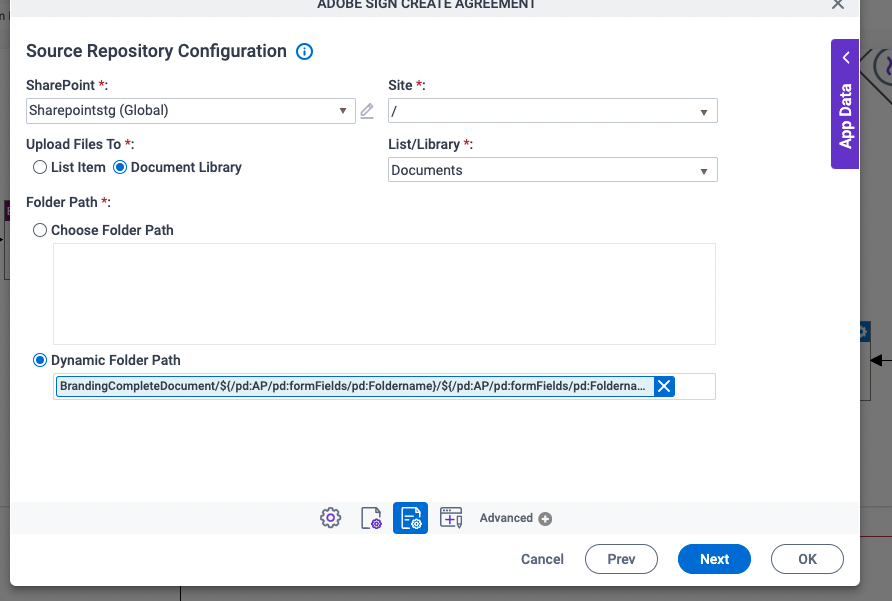
In my WF, i have to send a pdf file for e-sign stored in "OneDrive For Business". The file path is dynamic so i am using "Dynamic Folder Path" option under "Folder path" option when configuring "Source Repository Configuration" under "Adobe Create Sign Agreement" activity. I have stored the path in process variable which i then drop in "Dynamic Folder Path" field. This is how i generate the dynamic path: "Documents/JobApplication/${/pd:AP/pd:formFields/pd:txtDobNumber}/JobApplication_${/pd:AP/pd:formFields/pd:txtDobNumber}.pdf".
But the application fails while executing this activity. It logs the following error: { "error": { "code": "BadRequest", "message": "Unsupported segment type. ODataQuery: /users/0a130444-3eb2-4faa-a834-399e982b8bf3/drive/items/Documents/JobApplication/645646/JobApplication_645646.pdf", "innerError": { "request-id": "f9b46504-f100-41c9-b6d7-91a6206449e0", "date": "2019-07-03T14:44:18" } } }.
If i select the absolute path of a file in the source repository configuration, then everything works fine.
Any Idea?
-

Hi,
Can you please elaborate a little more preferably with an example.
As you can see my folder hierarchy is partially constant. The remaining half is generated dynamically including the filename.
for example: Documents/JobApplication/645646/JobApplication_645646.pdf". The bold part is constant while the rest of the path is dynamic. How would i know the id of the folder which is being generated on the fly. Besides, i need to provide the filename as well, don't i ?
Thanks
-
Ok, I was able to resolve it. Thanks for giving me the clue. Just to clarify, its not the ID of the folder, rather it more like an ID of the file being stored. It will be nice to explain this in the documentation.
I will explain it in a little more detail for others.
I am using one Drive for business as my source and target repository and Microsoft Word activity to store the eForm in pdf file format.The file path is created dynamically so i don't know the exact path before hand. Once the file is stored in one Drive, in the next activity i use "Create Agreement" of Adobe sign to send this file for digital signature. To get the dynamic path of the file i stored the Response ID (in the Microsoft Word, Target repository configuration) activity in the hidden form variable and then in the following activity i.e. "Update Process Data", i update the process variable with that ID. That ID is the direct access to the file. You can use that variable anywhere you need access to that file. You can actually use that hidden form variable directly wherever you need that file path. Since i use the same hidden form variable for different purposes, i have to get its data in a process variable before i overwrite it with something else. Another way would be write the response ID directly into process variable rather then writing it first into hidden form field and then process variable, i think it may work but i haven't tried it.


サインインしてコメントを残してください。
コメント
6件のコメント