Will Oauth2 Authentication access token for Office 365 expire?
AnsweredWe create Oauth2 Authentication access token for Office 365 using the steps in this article http://www.agilepointnxblog.com/create-non-expiring-access-tokens-for-office-365/
However, another article https://www.spblog.net/post/2018/08/24/SharePoint-lifehacks-create-SharePoint-app-registration-with-client-secret-which-never-expires mentions that
"ClientSecret generated with AppRegNew.aspx is that secret has expiration time. By default expiration is 1 year"
Does anyone encounter problem with Oauth2 Authentication access token for Office 365, and have to generate a new ClientSecret to update access token?
Thanks,
Michael
-
Official comment

Hi Michael,
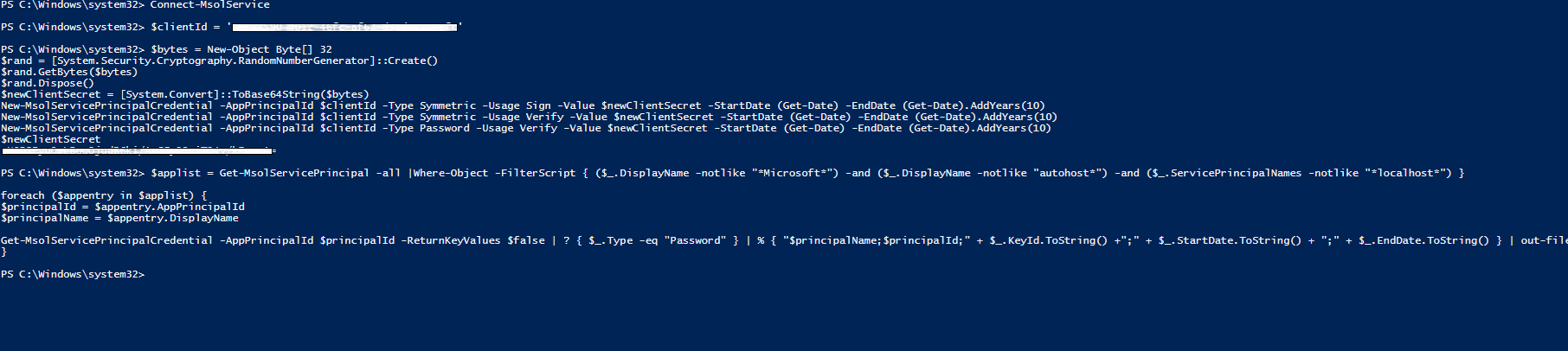
Client secrets for SharePoint Add-ins that are registered by using the AppRegNew.aspx page expire after one year. The blog : http://www.agilepointnxblog.com/create-non-expiring-access-tokens-for-office-365/ is updated with how to replace an expiring client secret and also how to register app with longer expiration time
Thanks,
Nithya VComment actions -

But the article from Microsoft, https://docs.microsoft.com/en-us/sharepoint/dev/sp-add-ins/replace-an-expiring-client-secret-in-a-sharepoint-add-in, has a note saying that:
By default, the add-in secret lasts one year. You can set this to a shorter or longer (up to 3 years maximum) by using the -EndDate parameter on the three calls of the New-MsolServicePrincipalCredential cmdlet. The value of the parameter must be a DateTime object set to no longer than 3 years from DateTime.Now.
So the 3 years maximum doesn't apply to the client secret used by AgilePoint Access Token?

Please sign in to leave a comment.
Comments
6 comments