Clear default value for a field
I have a field that I created with a default value of a piece of system data, then added to a couple of forms and published.
However now I want to remove the default value (for at least some of the forms).
I have tried editing the field and removing the default but it does not do it. The default value remains.
I must be having a blonde moment.
I am using NX 6.0 SP1 SU2 Hotfix 6
-

I can imagine several different scenarios based on your request. Here are two.
1)
If you want the change to occur over every form in an application, use the Promote to Library command on the exact form where you made your changes.

Then, go to every other form and Revert to Library.

2)
If you're trying to go into an already-running process and change the values, you'll first need to have an OnLoad rule that clears the field.
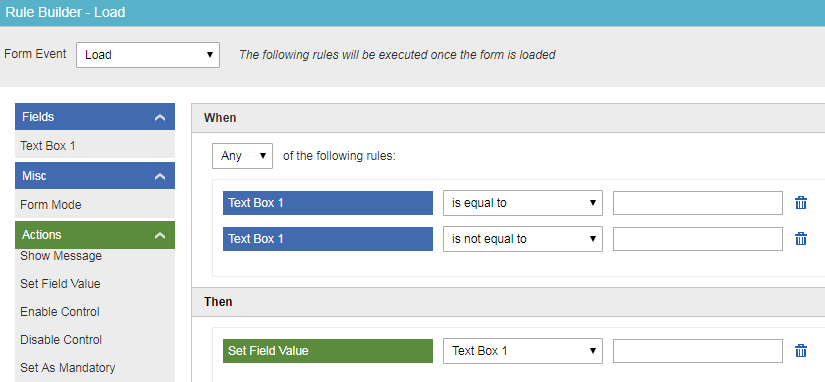
Then, migrate the process to your new version. When the user opens up the form, the field will clear, and after saving or submitting the form, you'll see the data update in the Runtime Manager.
-
Could that be a display error? Try clearing the default value, promoting to library, save+exit and close your browser. Or even exporting and re-importing the application as an extreme measure.
I know that I can only work in AgilePoint for about 1-2 hours at a time before I need to close/reopen my browser, so make sure you're not dealing with random cascading browser errors as well.
-

When I edit the field, then click on the x to clear the default value, then the X to close the field edit, it does not show the option to promote to library as it does not think anything has changed. The default value is still there when I look at the field or open the edit on the field again.
I tried with new browser session - same results.
Then I tried a reboot - same results.
Then I tried exporting and importing - same results.
There has got to be something simple that I am just not getting.
Is there anyway to see the properties of a field in the schema or library?
-
I don't ever remember there being an X to clear the field, so that's another awkward difference here. If you're on an On Prem version of AgilePoint, I don't know what custom stuff may have taken place in your tenant, so a support ticket may be a better option at this point.
The only guess I have left is that you need to make sure you are checking out/editing the form and you're not opening the form in View Only mode.
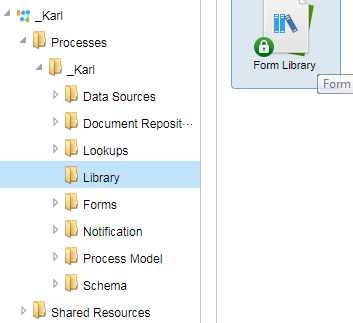
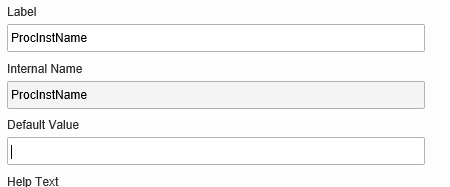
You are right that you can open the Control Library and see the same things there:


Please sign in to leave a comment.
Comments
6 comments