Triggering an AutoLookUp from a button click

Hi, I'm using AgilePoint NX 6.0. This is a 2 part question (I'll make a separate post about each one, since they are actually 2 separate issues). - this is the second post.
I need to trigger an autolookup off of a button click. Here is my form initially. I currently only have 2 "filter" fields for the query, but there will be more. So after the user enters their search fields, they would click the "Search" button.
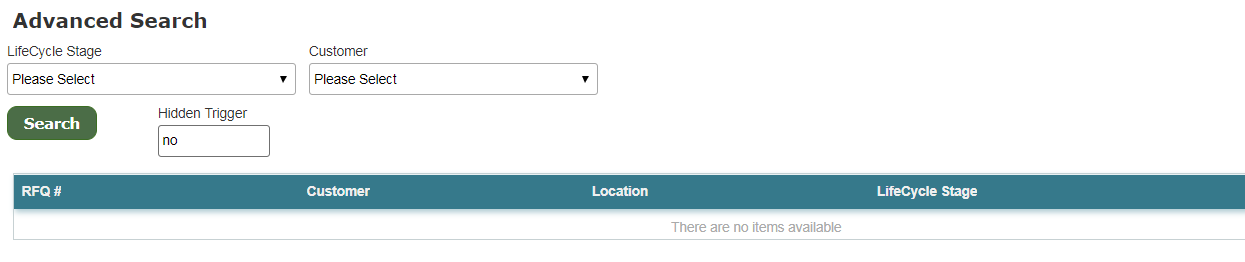
I originally let the autolookup trigger from a field change (no button) and I didn't like how it worked (it wasn't a good user experience). So I really want the button to trigger the autolookup.
In the autlookup, if I tell it to execute on field value change, I don't see my button as an option to select. I also have the Button Action set to "Click", which I'm assuming this is just allowing the user to click it, but there is no programming behind it (is there a way to tell it what you want the click to do?).
So, I made a trigger text field. On Button click, I have a rule to change the value of the hidden trigger field (default of "no") to "yes". Then set the autolookup to execute on this change.
- When I click the button, the hidden trigger field does change to "yes", but the autolookup doesn't execute.
- If I click in the actual text box for the hidden trigger field and manually change the text, then the autolookup will trigger.
- It's like the system changing the field value doesn't count. A human has to do it.
Any suggestions on how to get the button click to execute the autolookup (with or without the use of a trigger text field)?
Thanks in advance for your help!
-

Hi Gwen,
I don't know if it will work in your AgilePoint version, but in latest version it works. Following methids i would sudgest:
1) on button set a rule without conditions wirh action trigger autolookup
2) in advanced section of the button there is a field for javascript function, that should be executed. In this JS function you could use eFormHelper function to trigger autolookup
3) in the JS you could also manually trigger change event for the control, that will trigger the autolookup. The reason why it doesn't happen now, that with a rule there is no change event triggered.Please update if it helped.
Regards,
Alexey
請登入寫評論。
評論
2 條評論