Don't show Please Select in DropDown lists
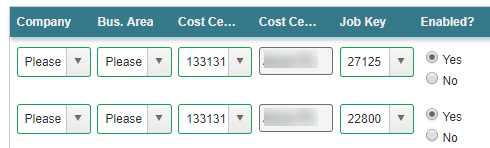
I have a repeating subform that I am populating from a SQL table. There is a field in the subform that I populate as a dropdown based on values stored in another SQL table (Company) If the SQL record that populates the repeating subform has no value in the Company Number field (which is a valid scenario), the field shows "Please Select" (seems reasonable). However, when I update the SQL table with the repeating subform entries, the Company number column now shows "-1". Can I stop the form showing "Please Select" or at least stop the table being updated with "-1"?
-

I just ran into a similar issue, so I'm not sure if this will help your exact scenario.
For one, you'll have to add the logic to loop through the repeating subform and check each item individually. I also included another function I found useful even though it's not called.
window.APNamespace = {};
var APNamespace = window.APNamespace;APNamespace.clearDOM = function(node)
{
while (node.children.length > 0)
{
node.removeChild(node.lastChild);
}
};
APNamespace.renderBlankDOM = function(node)
{
var option = document.createElement('option');
option.value = '';
node.appendChild(option);
};
APNamespace.selectDropdownOption = function(node, val)
{
for (var i = 0; i < node.options.length; ++i)
{
if (node.options[i].value === val)
{
node.options[i].selected = true;
break;
}
}
return node;
};function ExecuteOnQueryComplete()
{
var node = document.getElementById('NodeInternalPathNameHere');
APNamespace.clearDOM(node);
APNamespace.renderBlankDOM(node);
} -

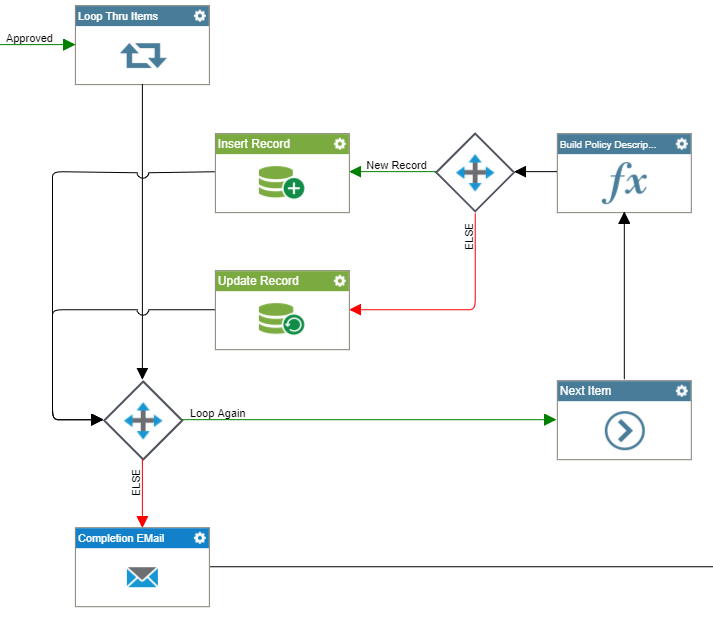
Thanks for your feedback Karl! I managed to do what I needed to do by adding in a Loop to go through the items in my repeating subform and used an Inline Function (@Replace(${/pd:AP/pd:processFields/pd:S0CompanyCode}, "-1", "")) to take out the '-1's. Also had to switch the Bulk SQL Update to individual SQL Inserts/Updates within the Loop. So now I have this process:
請登入寫評論。
評論
2 條評論