Column oriented subform

It appears that all the columns are allocated the same/equal amount of space. Is there a way to make some columns larger or smaller than other columns?? Using CSS I would assume...
-

Hi,
Either css or javascript.
Basically you have to change the width for the subCtrlPreviewCell and columnLabelWrapper elements.
css example:
configure your subform with a css class
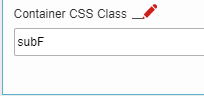
css code
/* first column */
.subF .subCtrlPreviewCell:nth-child(1),.subF .columnLabelWrapper:nth-child(1)
{
 width: 33.33%!important;
}

/* second column */
.subF .subCtrlPreviewCell:nth-child(2),.subF .columnLabelWrapper:nth-child(2)
{
 width: 13.33%!important;
}

...
If somebody knows a more elegant method, please let me know.
請登入寫評論。
評論
2 條評論