Dynamic Link in Document Transfer activity
Hi,
I have attachments set up to be saved to a new folder in a SharePoint document Library named the reference number (a field in my form) for the request. Once the form is submitted, I would like to have a document transfer from the new folder to a SharePoint list item (where our data is held). I'm having issues creating the dynamic path based on the newly created folder.
I was previously able to do this without creating a folder for each request, but discovered there have been issues with attachment being uploaded to the incorrect link. I've tried several different ways to make a dynamic path and have been unsuccessful.
What is the correct format/easiest way to achieve this?
-

Taylor,
I believe you would have gone through this document, if not please refer for dynamic folder path in SharePoint.
Can you share the error which you receive or the behavior which happens to you?
Thank You
AgilePoint NX Support.
-

I did go through that document and it doesn't resolve the issue of how to create the dynamic path. Someone else messaged me with a possible solution, but it also isn't working. Below is the error message I receive (and it also ends up cancelling my submission and forcing it out of the work flow). Thanks!
2020-12-14 13:20:01.816 >>> Exception >>>
DocumentTransfer
Process Instance='82930AD99517B7CB11BB3E38F7B81F1B'StackTrace:
at Ascentn.AgilePart.Shared.Misc.DocumentHelper.InitializeDestinationCredentials(String& DestinationAccessToken, List`1& destinationAccessCredentials, Hashtable sourceParams, Hashtable destinationParams)
at Ascentn.AgilePart.Shared.Misc.DocumentHelper.UploadDownloadFileRecursive(String sourcefilepath, String destinationfilepath, Boolean isOverwrite, String filefilter, String maxsize, String sourcefilepathtype, String newFolderName, Hashtable sourceParams, Hashtable destinationParams)
at Ascentn.AgilePart.Shared.Misc.DocumentHelper.DocumentTransferToDestinationStorage(NameValue[] parameters, String tenantID, String operationcaller)
at AgilePoint.AgilePart.DocumentTransfer.DocumentTransferChannel.SynchronizeStorage(WFSocialOperation operation)
at AgilePoint.AgilePart.DocumentTransfer.DocumentTransferChannel.PerformOperation(IWFAgilePartOperation operation)2020-12-14 13:20:01.816 >>> ThreadID(75): Marking operation DocumentTransfer failure and suspending procedure
2020-12-14 13:20:01.816 >>> AppSetting Entry Not found for Application key CSandbox_Token ApplicationName Global App Token
Parameter name: AppSetting Entry ID -
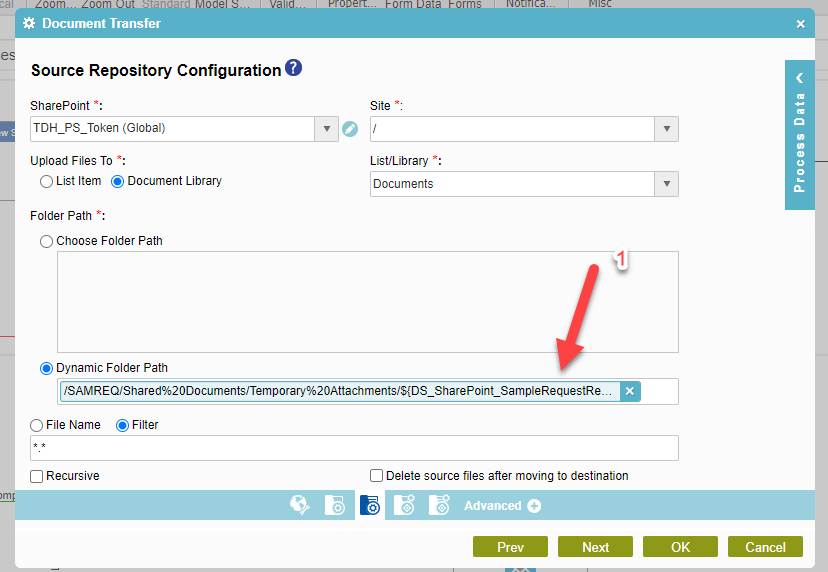
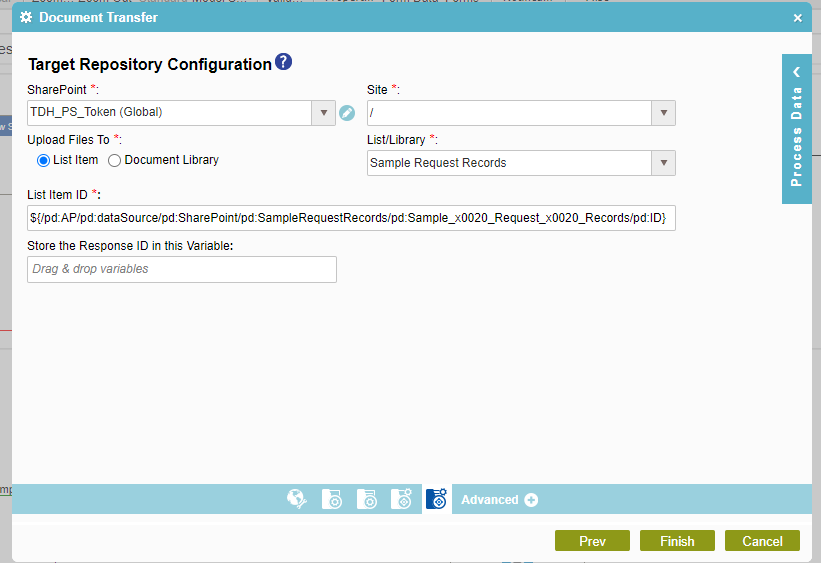
Yes, sorry for the late reply. I had some other urgent issues pop up. Here are the screenshots. The first on is the one I'm trying to determine how to make the dynamic path. the arrow is point to a data source field that will be different with each form submittal, but I have been unsuccessful in getting it to work. The second one shows the list item it is being transferred to (this part I haven't had any issues with).
Thanks!
-
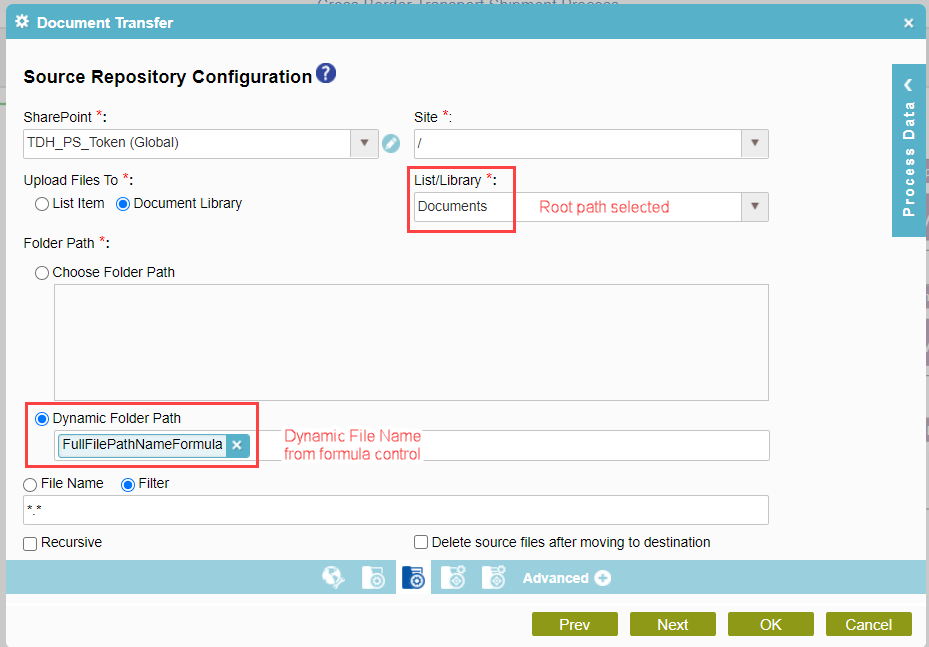
If anyone was wondering about the solution, I was able to achieve this with some help from AgilePoint. I added 3 hidden controls to my main form. File Path Name (text box with default value), Folder Name (text box - I have a rule that sets this equal to the sequence number generator that I use as a Request ID), and Full File Path Name (formula that I concatenate as below). For the File Path Name, I don't need to include the root SharePoint path (the overall document library path), since that is selected in the document transfer activity (see second screenshot).

请先登录再写评论。
评论
5 条评论