Data Refreshed in Database, but changes do not show in form when autolookup re-executed
I have NX 6.0. I have a form where a user "A" searches for previously entered quotes. When the search is performed (autolookup is executed), this works fine.
However, if another user "B" makes changes to the quote in a separate application (and I have verified the sql database reflects the update), then when user "A" re-executes the autolookup (without closing the form), the data is not refreshed on the screen to reflect the changes. The only way to see the updated data is to completely close the form and reopen it.
On the autolookup, I have tried all the "execute this lookup on" settings and none will re-execute the query. They simply show the originally queried data. I have "execute on session" set to "all sessions" and "trigger change event" set to "all target controls".
Any thoughts on how to get an autolookup to actually go to the database and pull fresh data?
Thanks!
-

Gwen,
To improve the performance of the lookup which get data from external systems, form remembers the data of possible lookup requests. We will check with our Product team if they have any suggestions for your use case and let you know.
note: NX 6.0 is almost 5 year old release version of AgilePoint NX. It is recommended to be on latest releases of AgilePoint to receive new enhancements and fixes.
Thanks,
AgilePoint Support. -

Thanks AP Support... looking forward to hearing back.
In the meantime, trying Alexey's suggestion...
Alexey, when you say the name of the lookup, you mean the lookup source, correct?
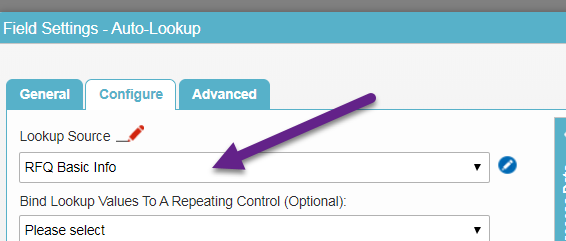
I tried the following - but it doesn't work, but thinking I don't have something correct.
- I have it as a shared javascript... is that correct?
- I have 3 lookups that run, is this correct to put the semicolons? Or should be 3 separate sections?
eFormCustomSettings.currentForm.lookupCaching.excludeItems =[
{lookupName : 'RFQ Basic Info',fieldIds:''};
{lookupName : 'RFQ Quote Development',fieldIds:''};
{lookupName : 'RFQ Order Fulfillment',fieldIds:''};
] -
I wasn't able to get the code above to work, but I got this to work:
eFormCustomSettings.currentForm.lookupCaching.excludeItems.push({lookupName:'RFQ Basic Info'});
eFormCustomSettings.currentForm.lookupCaching.excludeItems.push({lookupName:'RFQ Quote Development'});
eFormCustomSettings.currentForm.lookupCaching.excludeItems.push({lookupName:'RFQ Order Fulfillment'});I found this article - http://www.agilepointnxblog.com/disable-caching-of-lookup-within-a-form-session/ and used it. I added the javascript to the shared js for the form.
-

Hi Gwen,
sorry for late answer, but this will work:
eFormCustomSettings.currentForm.lookupCaching.excludeItems =
[
{lookupName : 'RFQ Basic Info',fieldIds:''},
{lookupName : 'RFQ Quote Development',fieldIds:''},
{lookupName : 'RFQ Order Fulfillment',fieldIds:''}
]note , instead of ;
Regards
Alexey
请先登录再写评论。
评论
5 条评论