Locking down the data of a repeating subform

I have a subform that captures the customers response to a proposal presentation. If the customer doesn't approve the proposal, the user logs the occurance using the subform.
Subform properties
Date of Presentation
Customer Feedback
Approval (Y/N)
(Hidden) Send Back to Sales
When the main form is submitted we use the Send Back to Sales to reroute back to the proposal team and they revise their proposal.
Once the new proposal is presented, the user needs to go back into the form and add a new customer response. I would like to freeze/lock the first response (subform record 1) preventing anyone from modifying the row. The user would need to select Add Record and populate another subform record.
Using JS, is there a way to disable all of the existing rows but still allow for the addition of a new row?
-

The only way I can think of to do this would be to put separate entry fields on your main form that match up to the Subform fields and create a button to add the data as a new row in the Subform. That way you can lock down the subform so that it cannot be edited but still allow new rows to be added to it.
Here is a quick little example I created:
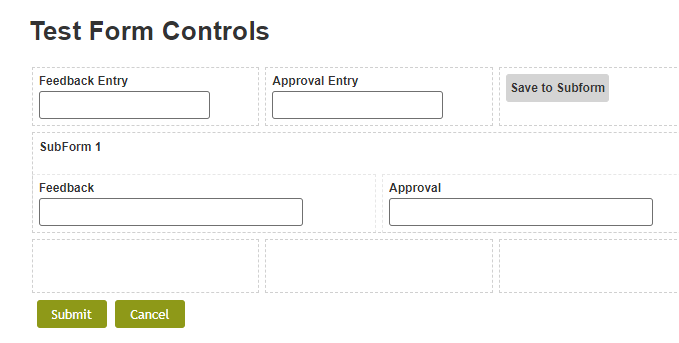
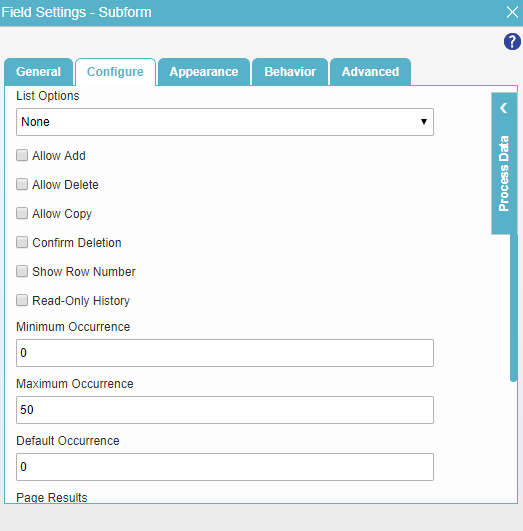
The Subform is configured to not allow any edits:
The button executes a JavaScript function that utilizes the addRowsToSubform method:
https://documentation.agilepoint.com/00/appbuilder/cloudjsAddRowsToSubform.html
I also added logic to clear out the values in the entry fields after the row is added to the Subform. Here is the JavaScript I used:
function addRowToSubform()
{
var feedback = getFieldNameObjectValue("FeedbackEntry");
var decision = getFieldNameObjectValue("ApprovalEntry");
var options = {};
options.fieldId = "SubForm1";
options.value = [{Feedback:feedback,Approval:decision}];
eFormHelper.addRowsToSubForm(options, function (result)
{
if (result.isSuccess)
{
console.log(result.data); //logs the data holds the empty object
}
else
{
console.log(result.error); // logs the hold exception object
}
});
setFieldNameObjectValue("FeedbackEntry","");
setFieldNameObjectValue("ApprovalEntry","");
}
function getFieldNameObjectValue(fieldName)
{
var value;
eFormHelper.getFieldValue({ fieldId: fieldName }, function (result) { value = result.data; });
return value;
}function setFieldNameObjectValue(fieldName, val)
{
eFormHelper.setFieldValue({ fieldId: fieldName, value: val });
}
请先登录再写评论。
评论
1 条评论