Attached filenames and URL

Hi,
How do i get filenames and download url from the File upload control. Following is the scenario.
User A upload n number of files (along with application) for review.
User B receives the application, review the application, and download the uploaded files names listed in some sort of repeater control in the form.
Moreover, after user b reviews the form and submits, the application archives in PDF format. It will be nice if the application and all the attached document package together at one place. Is there a way to achieve this?
-

Hi Aamir,
It would be helpful to learn more about your use case, but as I understand it, this can be achieved via out of the box file upload control functionality combined with the Microsoft Word stencil.
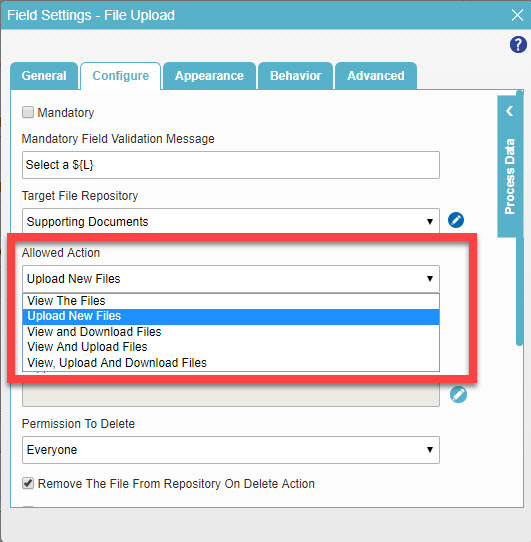
With the file upload control, we can restrict the actions a user can take during the various stages of the process. As an example, in the Submit step, a user might upload new files, whereas in subsequent steps only view the files. This can be controlled in the Configure menu for the control as shown below.
To create a PDF of the documents attached, we have a Document process stencil, which includes PDF conversion activity. I have linked the documentation below.
https://documentation.agilepoint.com/00/appbuilder/cloudenvShapePDFConverter.html
If you do ultimately need filenames and url, we can do that via script, and can get that for you if needed.
Lucas
-

Hi Manish,
AgilePoint has eform helper method “getUploadedFiles”. This method help us to get the control values. Please find the below script.
For your Reference
https://documentation.agilepoint.com/11/developer/cloudjsGetUploadedFiles.html
function GetFileUpload()
{
var options = {};
var fileName;
var docURL;
options.fieldId = 'FileUpload1'; // Please provide your control Internal Id
eFormHelper.getUploadedFiles (options, function (result)
{
if (result.isSuccess)
{
fileName = result.data.FileUpload1[0].fileName;
docURL = result.data.FileUpload1[0].url;
}

});
}
Regards,
Aravind

请先登录再写评论。
评论
4 条评论