How to Display Multiple CheckBox Values in a Word Document on Multiple Lines
We are working on an Employee Offboarding process. We have a field on our start form where the user indicates reasons for termination. The field is formatted as a checkbox field so that the user can select multiple values:
 When the form is submitted, the selected values are stored in the process schema with a semi-colon separating them:

As part of the process, we want to generate a .pdf document that lists the selected Termination Reasons. I have created a Word template document that has Merge Fields in it to show the reasons:
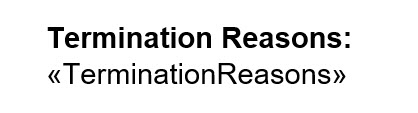
I then use a "Microsoft Word" activity in my process to create the .pdf file from the Word template document, mapping process schema fields to the Merge Fields. When I do this, the TerminationReasons appear in the merge field exactly as they are formatted in the schema data: in one long string with the semi-colons separating the different selected values:
 Does anybody know of a way that I could take this string of Termination Reasons and format it so that when it is printed in the Merge Field it will put some kind of new line command between each value so that they are listed separately? I am hoping that there is some kind of "Update Process Data" command (C# code) that I could do to replace the semi-colons with a CRLF but so far, everything I have tried has not worked.
-

OK - After much trial and error, I have come up with a solution for this problem! It seems like there should be an easier way to do this but this is what I came up with.
The crux of the problem was that I needed to get the list of selected check-box values into a repeating element that I could then drop into a Word Merge Field table. Here is what I did:
First I defined a hidden sub-form on my eForm. The subform is named "TermReasonsSubform" and contains only one text-box field called "TermReason":

I then created a JavaScript function that is executed by a "Before Submit" rule on the form:

The JavaScript function converts the list of selected values from the check-box into an array of objects that is then passed to the eFormHelper function for adding rows to a sub-form. You can read about the eFormHelper function here:
https://documentation.agilepoint.com/00/appbuilder/cloudjsAddRowsToSubform.html
The JavaScript function looks like this:

This results in having a repeating element in my process schema that contains all the selected check-box values when the eForm is submitted.
The next step was to modify my Word document and make the Merge Field for the Termination Reasons a table:
 The final step was then to modify the Microsoft Word activity in my process to map the new repeating element from my process Schema to the Merge Table field in the Word document. Here you can see the original TerminationReasons check-box field (hi-lighted in yellow) is no longer mapped to the Word document. That mapping has been replaced by the TermReason field from the Sub-Form: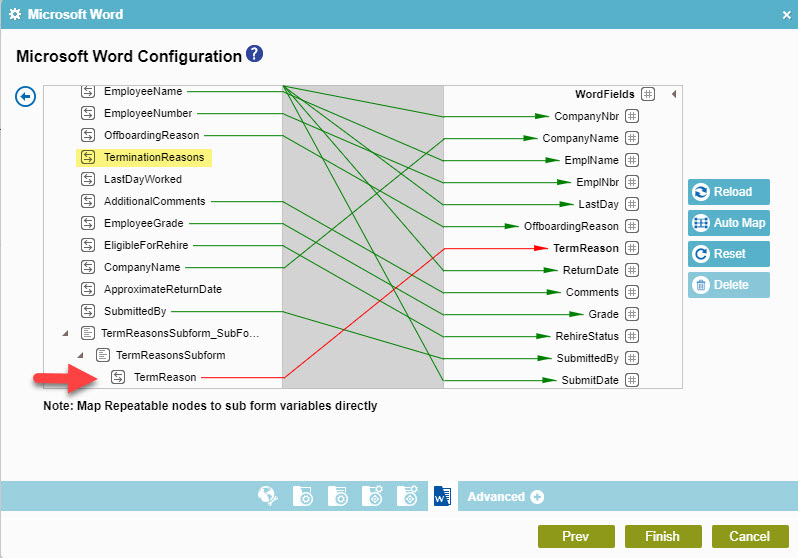
I don't know why the mapping tool is flagging the mapping in red. That usually indicates some kind of mapping error but the process works fine.
The end results of all this is that when a user selects multiple values from the check-box field:
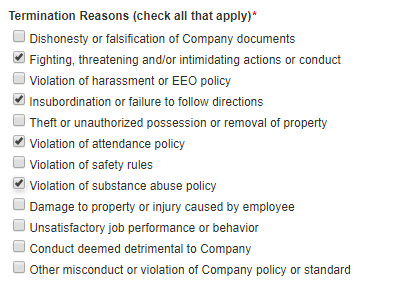
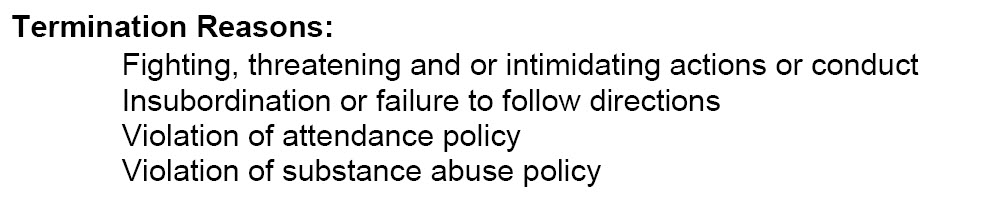
the selected values are presented as individual items in a list on the PDF document that is generated by the Word activity in the process:
请先登录再写评论。
评论
1 条评论