how to copy value from one field to another field
hi
I'm tryin to copy data from textbox field to another textbox field.
if that possible ?
I like to now how' step by step please
thanks, DORON
-

The easiest way would be to setup a rule on your first Text Box to copy its value to the second Text Box.
So you have two Text Box fields on your form:

Hover over the first Text Box and click on the "Rules" icon:

The Rule builder will open and you can then click and drag the Action "Set Field Value" into the "Then" section of the rule:


Then in the drop-down that appears, select your target field, "Text Box 2" in this example:
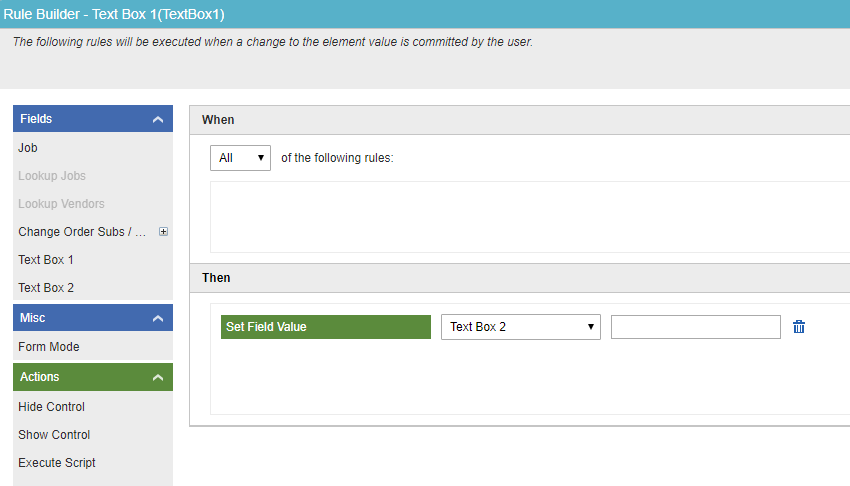
Now drag "Text Box 1" from the fields list on the left:

and drop it into the value box on the rule:

The rule will execute anytime a user changes the value of Text Box 1.
There is no need to set a "When" condition if you always want Text Box 2 to be populated with the value that is in Text Box 1.
-

Hi Doron,
the difference between taking the field from fields on the left and from fields from form data is the idea of client-side and server-side. If you take the field from the left, then AgilePoint gets the data client-side: from the form filled right now by the user. If you use the field from the process data, then agilepoint takes it "server-side": from the process data of the process instance. Normally the process data will be filled only after submitting the task, that's why it is empty.
To your second question: if you want data from the subform, then you need to put the row number of it:
SubForm1/TextBox1:[this]: current row
SubForm1/TextBox5:[n]: n-th row
SubForm1/TextBox5:[*]: all rows
Feel free to ask, if something is not clear.
Regards,
Alexey
-

thank you for the answer
it was very helpful.
I have another question.
I trying to build a Trip registration form for the users of our departments.
some of the data is auto-filled from the sap tables and Some are Manually by the users.
after the user finishes to fill the form, He presses the OK button, while a form with a copy of the data he entered opens for the confirmation the data or he can click Undo and return to edit the data.
Maybe you can explain to me a simple way to do this or maybe lead me to a tutorial for this kind of form?
thank you
サインインしてコメントを残してください。
コメント
5件のコメント