"loader" to show busy state of the form doesn't show
I have a form with an autolookup. The autolookup is triggered when the user clicks on a button on the form. When the user clicks the button, I would expect to see the form in a busy state until the autolookup completes, but there is nothing shown. It appears that the form is not busy but the user cannot do anything else on the form until the auto lookup completes.
How can I make the busy/loader show until my auto lookup completes?
-

Hi Sylvia Able,
Make use of below method for adding new loader with action message.
//ready to use showloader method
function ShowLoader(show, msg) {
    if (show) {
        var loader = $("#customLoader");
        if (loader.length <= 0) {
            var loader = $(
                '<div id="customLoader" class="loader" style="background: rgba(0, 0, 0, 0.25);"><div class="loaderMessageWrapper"><div id="msg" style="height: 30px; background: white; margin: auto; width: 450px; text-align: center; line-height: 30px; color: #63666A;"></div><div></div>'
           );
           $(".eFormSurface").append(loader);
        }
        loader.show();
        loader.find("#msg").html(msg);
     }
     else {
         var loader = $("#customLoader");
         loader.length > 0 && loader.hide();
     }
}
HOW TO USE :
ShowLoader(true, 'Please wait we are loading _____ '); // call this for showing loader
ShowLoader(false, 'Please wait we are loading _____ '); // call this for stoping loader
OUTPUT :

-

Hello Sylvia
You can use the below solution steps to add loader while you call the autolookup:
- Call the autolookup using eformhelper method and "ShowLoader(true, 'Please wait we are loading _____ ')"on the button configuration Advance Tab. For eform methods refer to the this documentation: https://documentation.agilepoint.com/8011/developer/cloudjsTriggerAutoLookup.html
- In autolookUp configuration tab set :
- Execure this lookup On as "Custom Trigger"
- Javascript to Execute after Lookup Completion field set the above function ShowLoader(false,"");
you can use inbuild loader method as well, Please refer to the documentation:https://documentation.agilepoint.com/8011/developer/cloudjsShowLoader.html
I hope this will improve your scenario.
-

Thank you both so much for responding.
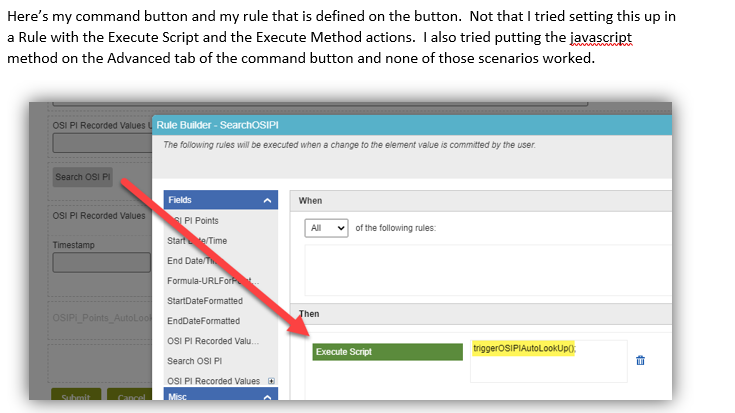
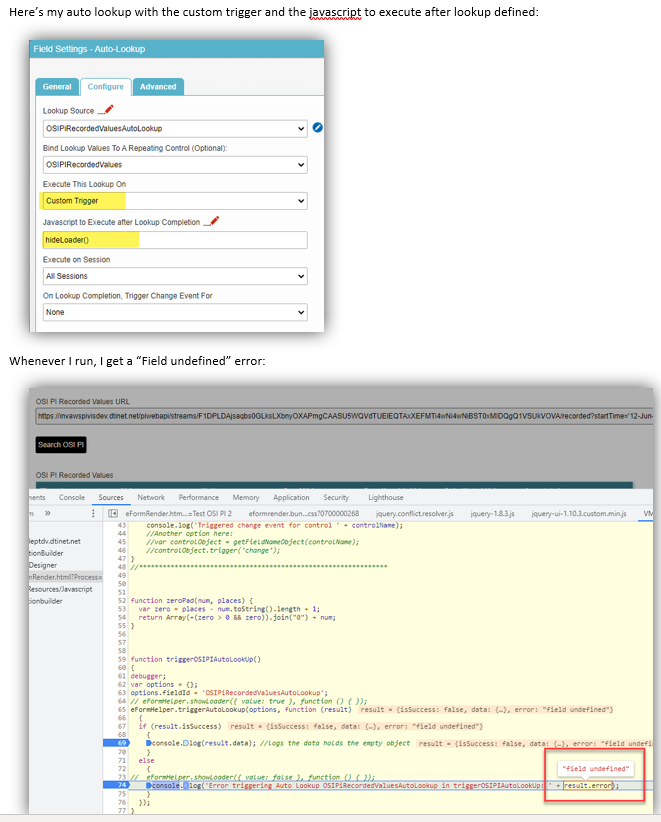
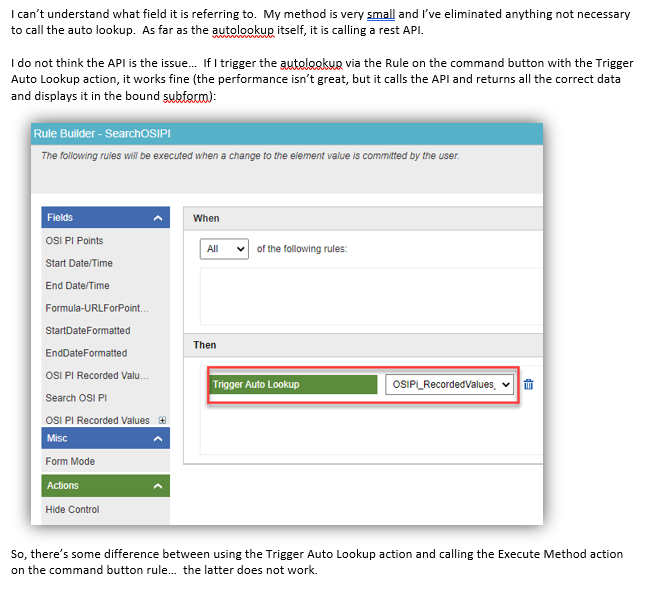
For some reason, I cannot get the eFormHelper.triggerAutoLookup to work on my auto lookup. I have done this before, but for some reason, it is throwing a "field undefined" error which I cannot figure out.
I've shared screenshots of the details below. I appreciate any help you can provide!
Thanks!
My javascript…I commented out the showLoader commands just to eliminate the possibility that something was wrong with those statements. Here, I’m just trying to get the auto lookup to run.
function triggerOSIPIAutoLookUp()
{
debugger;
var options = {};
options.fieldId = 'OSIPiRecordedValuesAutoLookup';
// eFormHelper.showLoader({ value: true }, function () { });
eFormHelper.triggerAutoLookup(options, function (result)
  {
  if (result.isSuccess)
    {
        console.log(result.data); //logs the data holds the empty object
    }
  else
    {
        //  eFormHelper.showLoader({ value: false }, function () { });
        console.log('Error triggering Auto Lookup OSIPiRecordedValuesAutoLookup in triggerOSIPIAutoLookUp: ' + result.error);
    }
  });
}


function hideLoader()
{
  debugger;
  eFormHelper.showLoader({ value: false }, function () { });
}
-

Hi Sylvia,
Based on the screenhots and script,
OSIPiRecordedValuesAutoLookup
Is the name of your lookup and not the AutoLookup control.
In order to use the
eFormHelper.triggerAutoLookup
You need to pass the Autolookup internal field name (shown on the general tab of the AutoLookup control).
Currently, the function try to find an AutoLookup control with the name provided - while the control name is probably different and for that reson you get this error.
If you'd like to use the lookup name, you need to use the function
eFormHelper.executeLookupBTW - if you already created the script in your form JS, it is better to use the rule action executeMethod, as executeScript rule action is intended for providing the script snippet as part of the rule action.
Try this.
Thanks,
Yaniv.
-
Thank you for explaining the difference between those two different commands; I was wondering that earlier! After I used the AutoLookup name, it worked.
The out of the box showLoader did not work; its as though I never called it. I had to implement Sampat's custom loader and that worked. I've had situations before where the out of the box loader didn't work; in fact, I don't think I've ever seen it work.
I appreciate the help of you both! Thank you!
サインインしてコメントを残してください。
コメント
5件のコメント